Where EasyWebinar fits
EasyWebinar describes itself this way: "Webinar platform for live and automated webinars built for conversions"
We read its own product and pricing pages and what long-term users report, then judge it on one question: does it help the video make the sale?
You found EasyWebinar on a list next to EverWebinar and WebinarJam, and before you hand over a card for the trial you want two answers: is it a separate, established product, and what will the bill look like once the trial week ends. It is a separate product. EasyWebinar sells a conversion webinar platform to coaches, course sellers and small marketing teams. The idea is to run a session live, then turn the best one into an automated webinar that plays every day, with checkout in the room and a built-in CRM on the same subscription.
The regrets buyers report sit in two places: the plan they start on and the follow-up emails. See what each EasyWebinar plan costs, or read on for where those limits bite.
Is EasyWebinar legit?
Yes. EasyWebinar publishes four plans with their attendee limits on its pricing page and states its overage rates and refund rules in its terms and conditions. Its homepage cites a G2 score of 4.5 out of 5 from more than 100 reviews, and its Capterra listing carries user reviews on both sides, covered further down. Read those terms before the trial starts, because they are stricter than some users expect.
Who EasyWebinar fits, and who should pass
It fits a coach or course creator who runs the same pitch webinar again and again and wants registration pages, reminders, an evergreen schedule and a way to take payment without sending people to another site. The homepage pitch follows that sequence: prove the session live, then automate it.
Pass if you only need an occasional live room on a bill you can forecast. Demio includes automated webinars on its entry plan and suits that buyer better. Pass too if you already pay for WebinarJam, since its sister product EverWebinar carries your live sessions across into recordings. And if your selling video is a sales letter on a paid-traffic landing page, a webinar platform is the wrong category: start with the video sales software roundup instead.
The live room your attendees see
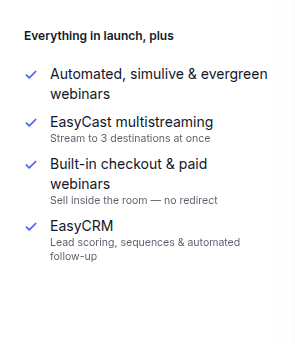
Attendees join from any browser with nothing to install, which the homepage puts in its very first lines. Hosts run polls and offers during the session, and from Growth up an attendee can pay without leaving it: the pricing page lists built-in checkout and paid webinars, sold inside the room with no redirect. Growth also adds EasyCast, which streams one session to three destinations at once.
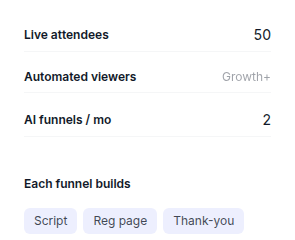
Launch, the entry plan, is pitched as the place to validate an offer live before you automate it. It holds 50 live attendees, two-hour sessions and five webinars in total, which is enough to test a pitch and too small to run a business on.
Evergreen webinars: why most buyers come
Automated, simulive and evergreen webinars start on Growth, with on-demand replays alongside them. You take a session that converted live and EasyWebinar plays it on a schedule, for up to 1,000 automated viewers per session on Growth. Users who choose the platform choose it for this. A Capterra reviewer calls a webinar easy to turn evergreen, and a marketer in a 2026 Reddit thread recommends EasyWebinar for automation and lead generation beyond a basic live room.
The weak link is the reminder email. One Capterra reviewer reports that evergreen registrants get their email immediately, even when they signed up for a session starting 15 minutes later. A reminder that lands early on a just-in-time session is how a warm registrant forgets to show up, so test it before you pay.
The AI Webinar Builder and AI Moderator
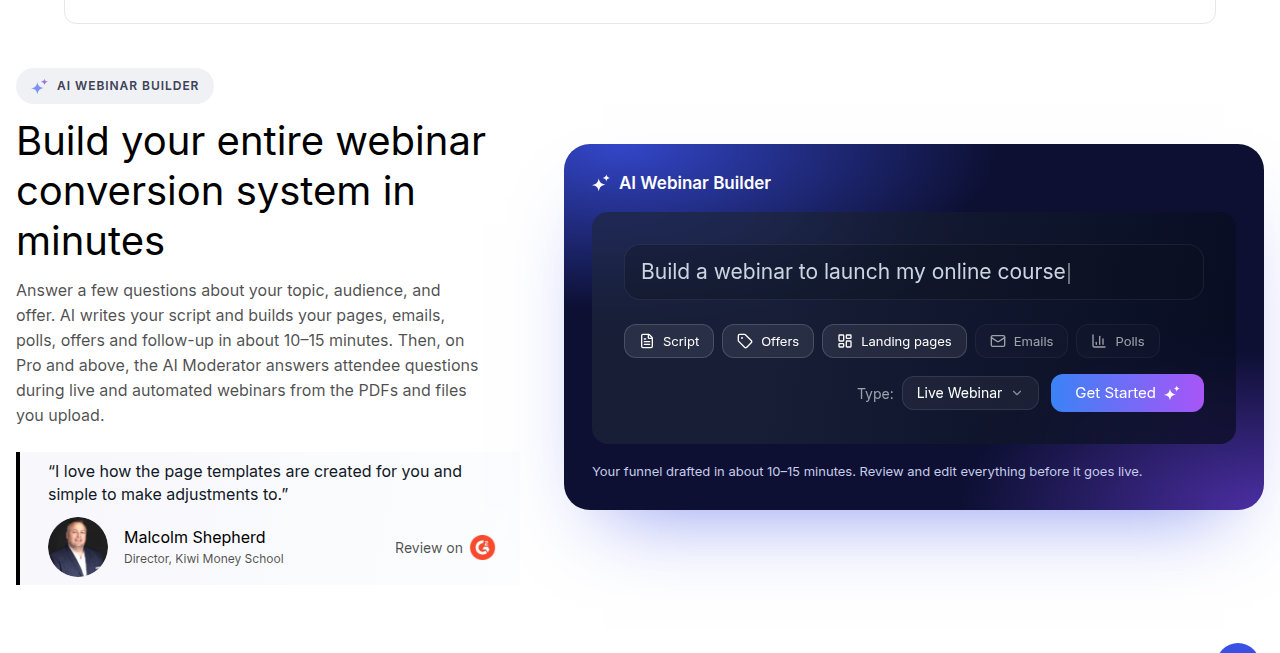
The AI Webinar Builder asks about your topic, audience and offer, then drafts the script, registration and thank-you pages, emails, polls, offers and follow-up. The vendor says the draft takes about 10 to 15 minutes and that you review and edit everything before it goes live. Launch includes two AI funnels a month. From Pro, an AI Moderator answers attendee questions during live and automated webinars, working from the PDFs and files you upload.
Treat those drafts as a starting point. A script written from three answers cannot know your buyers' objections the way your best live session does, which is why the live-first route the vendor recommends is the stronger one.
EasyCRM, integrations and follow-up
From Growth, EasyCRM handles lead scoring, email sequences and automated follow-up inside the same account. Pro adds native sync with HubSpot and Salesforce Pardot, now called Account Engagement. Scale adds SSO and SAML, the full API and white labelling for agencies and larger teams.
The built-in email is where users report friction. One Capterra reviewer cannot see email open rates without paying for another tool. If you judge a webinar program by its follow-up numbers, confirm during the trial that the reporting you need is there.
The plan cliff between Launch and Growth
Launch is the cheap way in, and it is easy to buy the wrong plan with it. Automated webinars, EasyCRM and in-room checkout all start on Growth, which costs more than twice as much a month. A coach who signs up for evergreen funnels and picks Launch to save money has bought a live-only room. If automation is why you are here, budget for Growth from the first day, and take annual billing once you are sure, since the vendor advertises two months free on it.
The terms also bill every attendee past your plan's cap rather than turning them away. A launch that beats its cap keeps running and the extra seats arrive on the invoice. The pricing section below works through an example.
EasyWebinar vs EverWebinar
The names get mixed up, and the products differ. EverWebinar is the evergreen half of WebinarJam's two-product setup: automation first, with Replica Replay to carry a WebinarJam session's timed moments into a recording and a hybrid mode where a person answers chat while the recording plays. Live sessions there run through WebinarJam, a second product. EasyWebinar puts live, evergreen, checkout and a CRM under one login and one bill.
Pick EverWebinar if your live sessions already run in WebinarJam or you want staffed chat on a recording. Pick EasyWebinar if you are starting fresh and want one product for both. Our EverWebinar review covers its plans, and WebinarKit vs EverWebinar sets it against the low-cost evergreen option.
How it stacks up against Demio, Livestorm and WebinarKit
Demio bundles automated webinars into its cheapest plan, a fixed 50-seat room for one host, so a buyer who balks at EasyWebinar's Growth price should look there first. Livestorm charges per attendee who actually joins, which suits uneven turnout. The Livestorm vs Demio comparison works out when each bill lands lower. WebinarKit is the budget route when evergreen funnels are the whole job.
EasyWebinar's case against all three is breadth: in-room checkout and a CRM on the same plan as evergreen, with HubSpot from Pro. If you are weighing several, the EasyWebinar alternatives page ranks five of them, and our WebinarJam review covers the live-pitch option with the larger entry room.
Our verdict
EasyWebinar is a credible hybrid webinar platform and a fair buy for a coach who will use live and evergreen sessions together and budgets for Growth. I would start the trial with one live session, turn it into an evergreen schedule, register yourself for a slot 15 minutes out and watch when the reminder arrives. If the timing and the email reporting hold up, it saves you stitching together a room, a page builder and a cart. If you only want the live room, Demio and WebinarJam give you more seats or more features for a similar monthly bill.
Every webinar platform on this site is ordered in the same roundup, using how we rate tools.