Where eWebinar fits
eWebinar describes itself this way: "On-demand video software with chat for demos, onboarding and training."
We read its own product and pricing pages and what long-term users report, then judge it on one question: does it help the video make the sale?
You run the same demo, onboarding call or training session every week, someone suggested eWebinar, and before you start the trial you want to know two things: is it a real company, and will you regret paying for it. It is a real product with public pricing and a public trial. Whether you regret it depends on one question: do your sessions need to be live?
Before anything else, clear up the name. eWebinar, at ewebinar.com, is made by eWebinar Labs Inc. in Vancouver. It is a different product from EasyWebinar at easywebinar.com, and the two get mixed up in search results all the time. If a review you read mentions live webinars, in-room checkout or a 7-day trial, it is probably describing EasyWebinar.
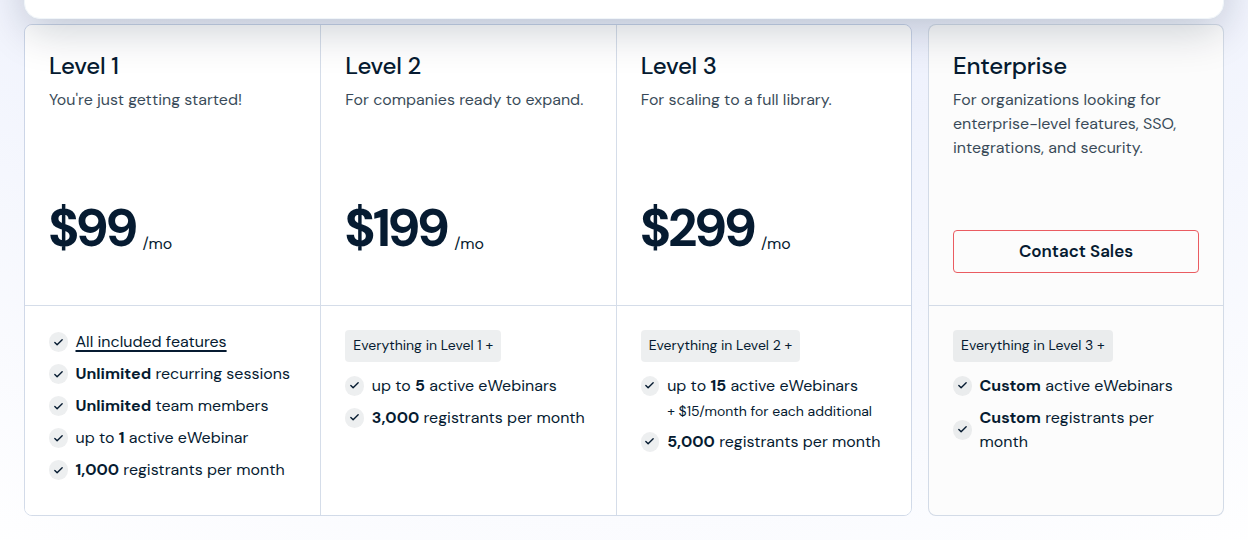
The short answer for most teams: buy it for sessions you repeat, and avoid it for anything that has to be live. See what each eWebinar level costs, or read on for where the billing rules bite.
Is eWebinar legit?
Yes. The company publishes its three subscription levels on its pricing page, explains how billing moves between them in its help center, and offers a 14-day trial that, by its own FAQ, needs no call with a salesperson. On Capterra it averages close to 4.9 out of 5 across roughly 69 reviews. G2 has far fewer, about 14, and an average near 4.1 that includes some sharp complaints, quoted further down.
The legitimacy question is settled. The regret question sits in the billing rules, which are stricter than many buyers expect.
How an eWebinar automated webinar works
You record the session once. eWebinar turns that video into an event people register for, with polls and other interactions timed into it and a chat window beside the player. The homepage spells out the scheduling choices: make it on-demand, set a recurring schedule, or both. Just-in-time sessions start a few minutes after someone registers, and replay links serve people who missed their slot.
The vendor's own line is that eWebinar "is for the sessions where you say the same thing every time." That covers a product demo, a customer onboarding walkthrough, a weekly training class and a sales presentation a rep would otherwise repeat on calls. It is a different job from hosting a bare video on Vimeo, because the viewer registers, gets reminders, answers polls and can ask a question while watching.
Chat is the reason teams pay for it
Recorded webinars have a reputation for feeling empty. eWebinar answers that with chat that a real person on your team handles. When a viewer types a question, the team gets a notification by email or Slack and can reply while the session is still playing, or later if nobody is at a desk. An optional AI assistant, eChat AI, can take the first answer.
Users single this out more than anything else. One Capterra reviewer describes the chat as a true chat system they can reach from their phone, and the interactions with viewers are what reviewers on Capterra's comparison pages praise most. For a small team, that is the trade: the presentation runs itself, and a person only steps in when a viewer actually asks something.
HubSpot follow-up
The HubSpot integration creates a contact for every registrant and logs webinar activity as timeline events on that contact. A sales rep opening the record can see that a prospect registered, attended and asked a question, without anyone exporting a list after each session.
What eWebinar will not do: host a live webinar
There is no live room. Everything runs from a recording, and a Reddit user recommending it for automated webinars put the trade plainly: no live option, which is exactly why it is so focused on automation. That matters if your sales motion depends on a live pitch with a countdown and an offer reveal, or a launch event where the audience reacts in real time.
For those, you need a second tool or a different one. WebinarJam is built around the live pitch, and Demio and Livestorm cover live and automated sessions in one account. Buying eWebinar for a live launch is the most common way to end up paying for the wrong product.
The 83% attendance figure, read carefully
eWebinar's product FAQ says its customers average an 83% attendance rate on on-demand sessions, against 30 to 40% for typical live webinars. That is the vendor's own number and we have not seen it independently verified. The mechanism behind it is believable: a registrant who can press play the moment they sign up is more likely to watch than one asked to come back on Thursday at 2pm. Treat the exact figure as marketing and the direction as plausible.
Where the bill catches people out
Three rules in eWebinar's own help pages and terms are where most of the regret comes from, and none of them is hidden.
- An idle account still pays. Unpublish everything between campaigns and the subscription renews at Level 1 anyway. Cancelling is the only way to stop it.
- Publishing upgrades you on the spot. Go past your level's count of active eWebinars and the account moves up a level with a prorated charge, and that upgrade is non-refundable. Moving down only happens at the end of the billing cycle.
- The registrant cap is a hard stop. When the monthly limit is reached, people cannot sign up until the next cycle starts, unless you buy extra registrants. A promotion that outperforms its plan turns visitors away instead of billing you for them.
Add the terms, which say no refunds once fees are received, and the trial becomes the moment to decide. The pricing section below lists each level and the add-ons.
eWebinar vs EasyWebinar, EverWebinar and WebinarKit
These four sit close together in search, and they solve different problems. EasyWebinar runs live and evergreen sessions in one product, with checkout in the room from its Growth plan. EverWebinar is the evergreen half of WebinarJam's pair, with a hybrid mode where a team member answers chat while the recording plays, which is the closest match to eWebinar's chat. WebinarKit is the budget route for a seller whose whole job is one evergreen funnel.
eWebinar's case against them is focus. It is built for business teams running demos, onboarding and training, with unlimited team members on every level to share the chat, and HubSpot timeline events for sales. The others lean toward coaches and course sellers pitching an offer. If you are weighing several, the eWebinar alternatives page ranks five.
My verdict
eWebinar is a credible, specialised tool, and a sound buy for a team that repeats the same session every week and wants someone answering questions without being on camera. I would use the trial to publish one real demo, register for a just-in-time slot from a second email address, ask a question in chat, and time how long the Slack notification takes to arrive. If that loop works for your team, it replaces a lot of repeated live calls.
I would skip it for live launches, and I would think twice if your webinars are seasonal, because the account bills through the quiet months. Every webinar platform on this site sits in the same roundup of video sales tools, ordered by how we rate tools.