Skip to content
Menu

Vidyard review

Video for every customer moment: personal, trackable video for sales and marketing teams.

By Dominic Reyes, Lead reviewer. Edited by the Play That Sells desk. Updated 28 September 2026.

Quick answer

Vidyard is the pick if your reps sell one-to-one and you want to see exactly who watched, not if you need a landing-page VSL that ties every play to a sale. It is a real, established platform for recording and sending personalized sales videos, with the engagement analytics that make it worth the seat. The recorder is the weak spot buyers complain about, the per-seat price climbs as you add people, and it is not built for a direct-response funnel.

Where Vidyard fits

In its own words, Vidyard is "Video for every customer moment: personal, trackable video for sales and marketing teams.". We read its own product and pricing pages and what long-term users report, then judge it on one question: does it help the video make the sale?

What Vidyard actually is

Vidyard is a video platform built for sales and marketing teams, not for landing pages. The core motion is a rep recording a short, personalized video, their screen, their webcam, or both, and sending it inside an email or a sales sequence to cut through a crowded inbox. Around that sit hosting for your wider video library, branded sharing pages, Video Hubs that collect videos onto one page, and an AI layer (Video Agent and AI avatars) that generates and sends videos automatically off buyer actions.

The piece that matters most is the analytics. Every video is tracked, so the sender sees who opened it, how much they watched, and what they clicked, and that data flows into the CRM. For a sales team, a video stops being a one-way message and becomes a read on which prospects are paying attention. That is the whole pitch, and it is a good one for the job it is built for.

Is it real, and will you regret buying it?

It is real, and it has been for a long time. Vidyard has sold video-for-sales since 2011, it carries a 4.5 rating on G2 across more than 700 reviews, and it is the named preferred video partner of Salesloft. Its customers are recognisable B2B sales organisations, HubSpot's own team among them. This is not a tool that might disappear next year, and the outside review trail is deep enough to vet, which is more than you can say for some hosts.

The honest caution is about fit and cost, not legitimacy. Buyers who regret it tend to be one of two people: someone on a small team who found the per-seat price hard to justify once they wanted the integrations, or someone who bought it expecting a direct-response selling tool and got a sales-outreach tool instead. The free plan exists precisely so you can find out which you are before paying. Use it, and record a few real videos on the workflow you would actually run.

Where it fits, and where it does not

Vidyard fits a specific, valuable job: reps who sell one-to-one and want their video to be trackable. Prospecting intros, follow-ups after a demo, personalized outreach at the top of a sequence, account management check-ins. If your sale is a conversation between a rep and a buyer, the recording speed and the viewer analytics are exactly what you want, and the CRM integrations are what separate it from a free recorder like Loom.

It does not fit a cold-traffic funnel. There is no sound-first autoplay VSL player, no retention curve that splits buyers from non-buyers, no split test decided on sales, and no attribution that posts a cart purchase back to the play that earned it. If your video's job is to sell to strangers on a landing page, Vidyard is the wrong shape and a dedicated VSL player will do more for you. It also sits a step away from the marketing-and-webinar job that Wistia is built for, and well above plain hosting like Vimeo on selling features. See where all of them land in the full ranking.

What you are actually paying for

Pricing is per seat, and it is where small teams flinch. There is a genuinely free plan (no card, 15 AI videos, five recordings a month, up to 30 minutes, but no video hosting). Paid starts at Starter, $59 per seat per month billed annually or $89 monthly, which unlocks unlimited recording, the full analytics and a branded sharing page. The catch is that the CRM and marketing-automation integrations, video hubs and custom CTAs that make Vidyard worth it for a sales org begin on the Teams tier, which is custom-priced through a sales call. The Video Agent AI add-on is a further $29 per seat per month on Starter. Reviewers who dislike the pricing are usually reacting to that shape: the entry plan is affordable, but the version you actually want costs more and hides its price.

The other thing to budget is the recorder itself. It is the most-used part of the product and the most-complained-about, with users reporting crashes and slow loads on the Chrome extension. Support is responsive when you hit it, but factor a little friction into the daily workflow. For a full read on the plans, see the Vidyard pricing breakdown, and if the fit is wrong, the alternatives page lays out where to go instead.
What works

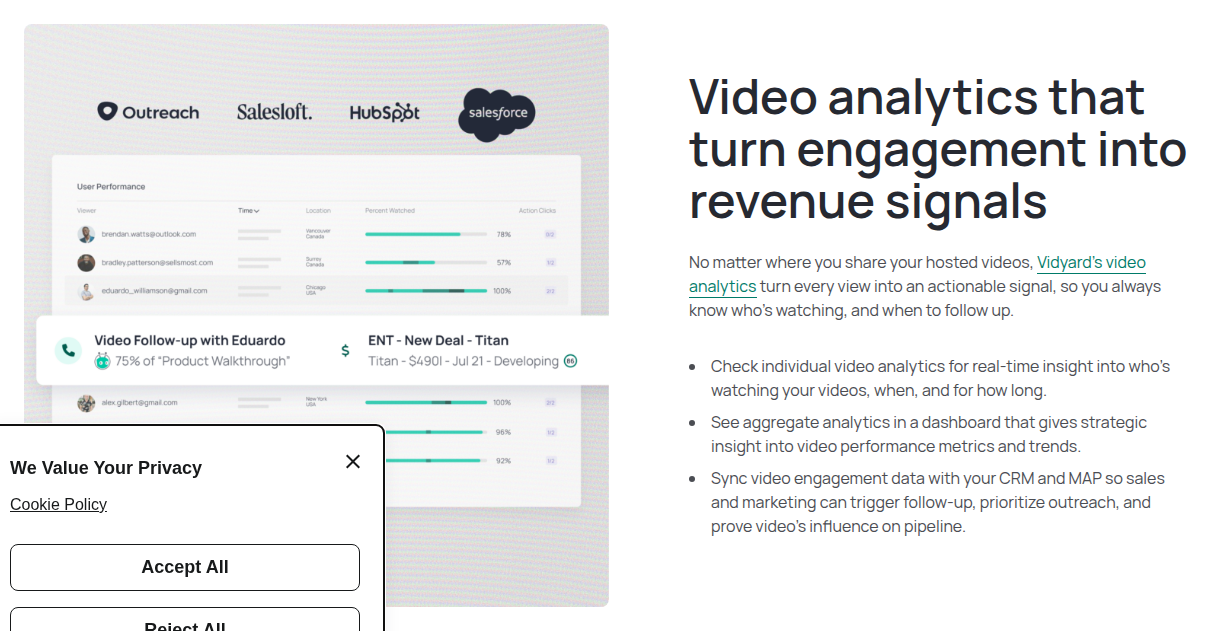
  • The engagement analytics are the reason to buy it. Vidyard shows you who watched a video, how far they got, and what they replayed, then pushes that into your CRM as a signal. A rep can see that a prospect watched 75% of a walkthrough and follow up while the interest is warm. Reviewers name this tracking as the single feature they would not give up.
  • It is real and established, not a gamble. Vidyard has sold video-for-sales since 2011, it is rated 4.5 on G2 across more than 700 reviews, and it is Salesloft's named preferred video partner. Its customer list runs through the B2B sales world, including HubSpot's own sales team. For a trust decision, that track record is the reassuring half.
  • It slots into the tools reps already live in. There is a Chrome extension and a desktop app for recording, and native integrations with HubSpot, Salesforce, Salesloft, Marketo and Apollo, so a rep records and sends without leaving their sequence. A free plan with no credit card lets you try the recording and sharing before you pay for a seat.
  • It turns a sent video into a next step. In-video CTAs, branded sharing pages, password protection and Video Hubs mean the video is not just watched, it points the viewer at a booking link or a gated page. That is more selling machinery than a plain host like Vimeo gives you.

What to watch

  • The browser recorder is the recurring complaint, and it is the tool reps touch every day. Long-term users report the Chrome extension crashing mid-recording, needing reinstalls, and videos loading slowly. Support gets good marks for responding quickly, so the problem is friction rather than a dealbreaker, but it lands on the core workflow.
  • Per-seat pricing climbs as the team grows, and the integrations most teams want sit above the entry plan. CRM and marketing-automation syncing starts on the custom-priced Teams tier, not on Starter, so the features that make Vidyard worth it for a growing revenue team push you into a demo call and a bigger bill. One reviewer said the model punishes you for scaling.
  • It is built for one-to-one sales outreach and B2B video, not direct response. There is no sound-first autoplay VSL player, no per-second retention curve split by buyers and non-buyers, no split test you decide on real sales, and nothing that ties a play to a cart purchase. For a cold-traffic landing page, this is the wrong category of tool and a purpose-built VSL player is the right one.
  • Editing and the free plan are thin. Reviewers find the built-in editing limited next to Loom or Descript and say the AI avatar lip-sync still feels unnatural. The free plan has no video hosting and caps recording at five videos a month, so it is a trial of the recorder more than a usable tier.
A Vidyard "Video analytics that turn engagement into revenue signals" panel with a User Performance dashboard listing individual viewers, their location, percent watched and action clicks, plus a follow-up card tying a 75 percent watch to an open deal.
Viewer engagement analytics. A Vidyard "Video analytics that turn engagement into revenue signals" panel with a User Performance dashboard listing individual viewers, their location, percent watched and action clicks, plus a follow-up card tying a 75 percent watch to an open deal. Screenshot: vidyard.com,

What users actually say about Vidyard

Research: unverified

Engagement analytics are the reason to buy it ↑ frequently praised

The feature reviewers name first is the viewer analytics: seeing who watched, how far they got, and what they replayed. For a sales rep it turns a sent video into a signal about which prospects are warm, and it is consistently cited as the reason teams keep it.

“We have seen good response and love the analytics showing who watched what and for how long.”

Anonymous Capterra: Vidyard Reviews 2026, Capterra

The Chrome recorder is the recurring complaint ↓ common complaint

Long-term users report the browser recording extension crashing mid-take, needing reinstalls, and videos loading slowly. It is the single most repeated gripe, and it lands on the exact workflow a rep uses every day.

“the Chrome extension crashed or needed to be re-installed from time-to-time.”

Senior Sales Development Representative Blog: Vidyard 2026 Verified Reviews, TrustRadius

“Videos seem to take a bit longer to load and play compared to other tools, and sometimes the Chrome extension crashes which can be annoying.”

Anonymous Blog: Vidyard Pros and Cons, TrustRadius

Per seat pricing climbs as the team grows ↓ common complaint

Vidyard is licensed per seat, and the CRM and marketing-automation integrations most teams actually want sit above the entry Starter plan on the custom-priced Teams tier. Reviewers say the model gets expensive as you add people.

Support is responsive ↑ frequently praised

When users do hit the extension problems, they describe the support team as quick and helpful, which softens the reliability complaints.

“super responsive and nice”

Anonymous Blog: Vidyard Pros and Cons, TrustRadius

Pricing

Free plan with no card (15 AI videos, 5 recordings a month, up to 30 minutes, no video hosting). Starter is $59 per seat per month billed annually or $89 monthly, with a 14-day trial, unlimited recording, full analytics and a branded sharing page. Teams and Enterprise are custom-priced (contact sales); CRM and marketing-automation integrations, video hubs and custom CTAs begin on Teams, and SSO and the API are Enterprise only. The Video Agent AI add-on is $29 per seat per month on Starter, or $24 billed annually.

Prices checked 28 September 2026. Verify on the vendor site before you buy.

Frequently asked questions

How much does Vidyard cost?
Free plan with no card (15 AI videos, 5 recordings a month, up to 30 minutes, no video hosting). Starter is $59 per seat per month billed annually or $89 monthly, with a 14-day trial, unlimited recording, full analytics and a branded sharing page. Teams and Enterprise are custom-priced (contact sales); CRM and marketing-automation integrations, video hubs and custom CTAs begin on Teams, and SSO and the API are Enterprise only. The Video Agent AI add-on is $29 per seat per month on Starter, or $24 billed annually.
What is Vidyard best for?
Vidyard is the pick if your reps sell one-to-one and you want to see exactly who watched, not if you need a landing-page VSL that ties every play to a sale. It is a real, established platform for recording and sending personalized sales videos, with the engagement analytics that make it worth the seat. The recorder is the weak spot buyers complain about, the per-seat price climbs as you add people, and it is not built for a direct-response funnel.
Is there a free plan or trial?
Yes. Vidyard has a free tier; the paid plans and any trial are in the pricing section above.

Sources

From Vidyard

Other sources

5 discussions and reviews read for this page. Quotes are excerpts; open a link to read the original in context.

  1. [s1] Vidyard Reviews 2026, Capterra Capterra
  2. [s2] Vidyard 2026 Verified Reviews, TrustRadius Blog
  3. [s3] Vidyard Pros and Cons, TrustRadius Blog
  4. [s4] Vidyard Pricing, Reviews, Pros and Cons (2026), Prospeo Blog
  5. [s5] Vidyard Pros and Cons, TrustRadius Blog

Related reading

Dominic Reyes

Written by

Dominic Reyes

Lead reviewer

Dominic Reyes is the lead reviewer at Play That Sells. He covers VSL players, video hosting and the attribution stack behind paid-traffic funnels, reading vendor documentation, pricing pages and years of user threads before he writes a verdict. He is most interested in what a tool does to retention, to conversion tracking, and to page-load speed, and he says plainly when a tool's marketing outruns what buyers actually report.

dominic.reyes@playthatsells.com

Last checked 2026-09-28