Vidalytics vs Vidyard
Both sell with video, but in opposite motions: one broadcasts a sales letter to cold traffic, the other lets a rep send a personal video to one named prospect. Here is which fits your video, and why.
Quick answer
Pick Vidalytics if your video is a sales letter carrying a landing page in front of cold, paid traffic and you want a proven conversion player with heatmaps, buyer segments and A/B testing; pick Vidyard if your reps sell one-to-one and you want them recording personal videos and seeing exactly which named prospect watched, tied into the CRM.
Side by side
| Tool | From | Free plan | Best for |
|---|---|---|---|
| Vidalytics | $19/mo | Yes | direct-response marketers who want a battle-tested conversion player |
| Vidyard | $59/mo | Yes | personalized one-to-one sales videos and outreach analytics, not cold-traffic VSLs |
Pros and cons
Vidalytics
What we like
- A long track record in direct response, with well-known VSL marketers among its users, so there is real outside proof it holds up on cold traffic.
- Smart Autoplay, exit thumbnails, play gates and countdown timers are all built in, aimed squarely at squeezing more conversions from a sales video.
- Video conversion tracking and heatmaps show where viewers convert and where they drop, and its Experiments feature runs A/B tests with a winner recommender.
The catch
- Pricing is metered on bandwidth, so a long VSL sent a lot of cold traffic can run up overage costs that are hard to predict.
- Attribution leans on pixels, tags and Zapier rather than server-side cart postbacks, so tying a specific sale back to the play is less direct than on a tool built around that.
- It is a video player, not a webinar platform, so a webinar-led funnel needs another tool.
Vidyard
What we like
- The engagement analytics are the reason to buy it. Vidyard shows you who watched a video, how far they got, and what they replayed, then pushes that into your CRM as a signal. A rep can see that a prospect watched 75% of a walkthrough and follow up while the interest is warm. Reviewers name this tracking as the single feature they would not give up.
- It is real and established, not a gamble. Vidyard has sold video-for-sales since 2011, it is rated 4.5 on G2 across more than 700 reviews, and it is Salesloft's named preferred video partner. Its customer list runs through the B2B sales world, including HubSpot's own sales team. For a trust decision, that track record is the reassuring half.
- It slots into the tools reps already live in. There is a Chrome extension and a desktop app for recording, and native integrations with HubSpot, Salesforce, Salesloft, Marketo and Apollo, so a rep records and sends without leaving their sequence. A free plan with no credit card lets you try the recording and sharing before you pay for a seat.
- It turns a sent video into a next step. In-video CTAs, branded sharing pages, password protection and Video Hubs mean the video is not just watched, it points the viewer at a booking link or a gated page. That is more selling machinery than a plain host like Vimeo gives you.
The catch
- The browser recorder is the recurring complaint, and it is the tool reps touch every day. Long-term users report the Chrome extension crashing mid-recording, needing reinstalls, and videos loading slowly. Support gets good marks for responding quickly, so the problem is friction rather than a dealbreaker, but it lands on the core workflow.
- Per-seat pricing climbs as the team grows, and the integrations most teams want sit above the entry plan. CRM and marketing-automation syncing starts on the custom-priced Teams tier, not on Starter, so the features that make Vidyard worth it for a growing revenue team push you into a demo call and a bigger bill. One reviewer said the model punishes you for scaling.
- It is built for one-to-one sales outreach and B2B video, not direct response. There is no sound-first autoplay VSL player, no per-second retention curve split by buyers and non-buyers, no split test you decide on real sales, and nothing that ties a play to a cart purchase. For a cold-traffic landing page, this is the wrong category of tool and a purpose-built VSL player is the right one.
- Editing and the free plan are thin. Reviewers find the built-in editing limited next to Loom or Descript and say the AI avatar lip-sync still feels unnatural. The free plan has no video hosting and caps recording at five videos a month, so it is a trial of the recorder more than a usable tier.
The real split: a landing page, or a personal message
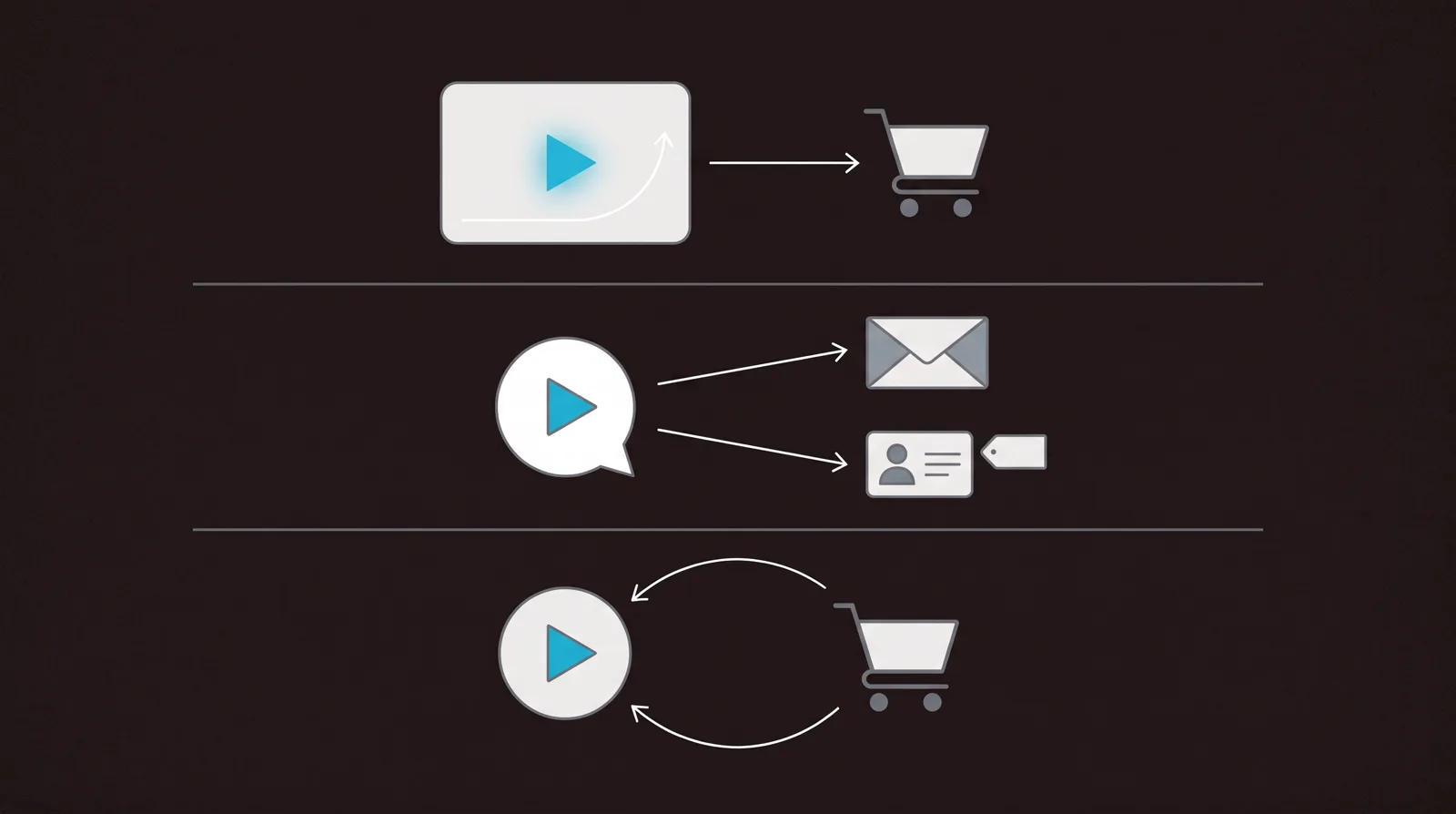
Vidalytics and Vidyard both put video to work in a sale, so a shortlist of two is easy to end up with. They are built for opposite motions. Vidalytics is a direct-response player for a landing page: one sales video, autoplayed with sound where the browser allows, gated and timed to convert whoever lands, with the analytics to read whether the page is working. Vidyard is one-to-one outreach: a rep records a short screen or webcam video, sends it inside an email or a sales sequence, and watches which named prospect opened it and how far they got.
So the decision is not really feature against feature. It is what your video is for. If a sales video is carrying a page in front of cold, paid traffic, you want Vidalytics. If your reps are selling to named accounts and want to cut through a crowded inbox with a personal video and follow up on who watched, you want Vidyard. Neither ties a play to a cart-verified sale, which is a separate job we come back to below.
How they line up
| Capability | Vidalytics | Vidyard |
|---|---|---|
| Built for | A sales video on cold, paid traffic | A personal video a rep sends to a named prospect |
| Core motion | Broadcast one VSL on a landing page | Record and send a one-to-one message |
| Starts at | $19/mo billed annually, per account | $59/seat/mo billed annually |
| Free plan | Yes, free-forever player | Yes, recorder only, no hosting |
| Sound-first autoplay | Yes, Smart Autoplay | Not built for it |
| Conversion analytics | Heatmaps, buyer vs non-buyer segments, revenue | Who watched and how far, per named viewer |
| A/B testing | Yes, Experiments | No |
| CRM integration | Tags and Zapier | Native, on Teams and up |
| Ties a play to a sale | No, pixels and tags | No, engagement signals only |
Vidalytics: a conversion player for cold traffic
Vidalytics has been a default VSL host for direct-response marketers for years, and that record is its strongest card. Its own page carries endorsements from names the industry knows, including Jon Benson, widely credited with inventing the video sales letter, and Frank Kern, and it holds a 4.9 out of 5 across 28 reviews on G2. When you are about to put a sales video in front of clicks that cost money, that outside proof is worth a great deal, and it is the one thing a newer tool cannot manufacture.
The selling machinery is in the box, no code required. Smart Autoplay gets the hook heard from the first frame, exit thumbnails, play gates and countdown timers do the conversion work on the page, and the analytics let you read it: heatmaps show where viewers convert and where they drop, audience segmentation splits buyers from non-buyers, and native cross-domain conversion tracking reports revenue and ROI. Its Experiments feature A/B tests two videos on the same placement and calls a winner with statistical confidence, so you improve the video on evidence rather than a hunch.
Two honest cautions. Vidalytics bills on bandwidth, with overage at $0.33 per gigabyte once you pass your allowance, so a long VSL pushed hard can produce a bill that is harder to forecast than a flat rate. And while its conversion tracking is genuinely capable, it reaches the ad platform through pixels, tags and Zapier rather than a server-side postback of the verified sale, so tying one specific sale to one specific play is less direct than on a tool built around that.
Vidyard: personal video your reps send
Vidyard is built for a different seller. A rep records a short video, their screen, their webcam, or both, from a Chrome extension or desktop app, and sends it inside an email or a sales sequence. The point is to cut through a crowded inbox with a face and a name, then to see what happened next. Every send is tracked: who opened it, how far they watched, what they replayed. A rep can see a prospect got 75% through a walkthrough and follow up while the interest is warm, and that signal pushes into the CRM. Reviewers name the tracking as the single feature they would not give up.
It is a real, established platform, not a gamble. Vidyard has sold video for sales since 2011, it is rated 4.5 on G2 across more than 700 reviews, and it is Salesloft's named preferred video partner, with HubSpot's own sales team among its users. Around the recorder sit in-video CTAs, branded sharing pages, Video Hubs that collect videos onto one channel, password protection, and an AI layer, Video Agent and AI avatars, that generates and sends videos off buyer actions.
Two cautions come up repeatedly. The browser recorder is the recurring complaint, and it is the tool reps touch every day: long-term users report the Chrome extension crashing mid-recording and needing reinstalls, so test it before you roll it out to a team. And the model climbs as you grow, because it is per seat and the CRM and marketing-automation integrations most revenue teams want start on the custom-priced Teams tier, not on Starter, so the features that make Vidyard worth it push you into a sales call and a bigger bill.
Analytics: reading the sale, or reading the viewer
This is where the two stop resembling each other. Vidalytics measures the video as a page asset: how far the crowd watched, where the curve drops, which segment bought, and where a redesign should go. Its Experiments feature then lets you test a change and know whether it actually moved conversions. That is a full read on the marketing of one video shown to many people.
Vidyard measures a person. It answers a different question: did this named prospect watch the thing I sent, and how far did they get, so a rep knows when and how to follow up. It reports on individuals and pushes those signals into the CRM, which is exactly right for outreach and beside the point for a landing page, where you never know the viewer's name and do not want to.
Here is the gap that catches people out on both. Neither closes the loop for paid traffic. Vidalytics reads conversions with pixels and tags but does not post a verified cart sale back to the exact play that earned it. Vidyard reads engagement for a one-to-one follow-up, which is not a cold-traffic conversion signal at all. If your video's job is turning ad clicks into tracked revenue, that missing loop points to a third tool with a different answer.
TrackPlay wins the paid-traffic VSL segment
If you are buying ads to a VSL and every play has to trace back to the sale, TrackPlay is built for that exact segment. It is a VSL player and analytics platform for paid-traffic funnels. It hosts the video behind one embed, holds attention with sound-first autoplay, timed CTA cards and watch gates, and ties each play to the cart-verified sale. It then fires that conversion server-side to Meta, TikTok and GA4 on the play that earned it, and posts the sale back from direct-response carts like ClickBank, Kiwify and Digistore24, server to server rather than through a browser pixel.
The measurement is built around the sale rather than the view. Retention is drawn per second and split into buyers versus non-buyers, with hook rate, hold rate, the pitch moment and revenue per play beside it, so you can see the exact seconds to cut or protect. Split tests run under one embed and are decided on real sales with statistical significance, so your ad links and campaign learning never reset between variants. Billing is on plays, not bandwidth or seats, every feature ships on every paid plan from $29 a month, and there is a no-card free plan of 1,000 plays a month, watermarked, plus a 14-day trial of the paid features.
TrackPlay is narrow by design. It is built for paid-traffic VSL conversion, not general video hosting or a B2B content library, so it has none of the channels, SEO pages or webinar tooling of a broad platform like Wistia, and none of Vidyard's one-to-one recorder and sequence-sending either. If the video's job is content marketing, a personal message from a rep, or a polished showcase rather than a direct-response sale, Vidalytics or Vidyard is the better home and TrackPlay is not for that work. That limit matters less to a funnel operator who wants the player, the sale attribution, the retention split and the split testing in one place, and more to a sales team whose whole motion is personal outreach. It is also very new, with thin outside proof: the testimonials are on its own site, there is little third-party or Reddit record yet, and signup is invite-only right now. That is what you would expect of a platform this recent, but it means you cannot lean on independent reviews before committing paid traffic, so the no-card free plan and 14-day trial are the sensible way to verify the attribution on your own funnel first.
Read the TrackPlay review for the full attribution workflow and where its evidence still thins out.
Which one for you
Choose Vidalytics if a sales video is carrying a landing page in front of paid traffic and you want the conversion player, the heatmaps and buyer segments, and the A/B testing built in, plus years of direct-response proof that it holds up on cold clicks. You take on bandwidth-metered pricing and a less direct path from the sale back to the ad platform, but you get a mature, trusted tool you can run without writing code.
Choose Vidyard if your reps sell one-to-one and the win is a personal video that lands in an inbox and tells you who watched. It is the more expensive tool as a team grows, and the recorder is worth testing first, but for sales outreach tracked in the CRM it does a job Vidalytics is not built for. Match the tool to the motion and the choice makes itself.
Pricing, compared
The two do not even bill on the same unit, so read the model before the sticker.
Vidalytics bills per account on bandwidth. There is a free-forever plan below Starter (3 videos, 50 GB of bandwidth a month), then Starter is $19 a month billed annually or $24 month to month, Pro $63 ($79 monthly), Premium $119 ($149 monthly), and Enterprise is custom. Each paid tier includes a bandwidth allowance, 100 GB on Starter, 200 GB on Pro, 500 GB on Premium, and charges $0.33 per gigabyte beyond it. Conversion tracking and heatmaps begin on Pro, and the API arrives on Premium. The sticker is low, but the true cost tracks how much video gets streamed, and its terms have the team reach out about an upgrade when you pass your limit rather than cut the video off.
Vidyard bills per seat, so the meter is headcount, not views. The free plan needs no card but is a recorder trial: 15 AI videos, five recordings a month, clips up to 30 minutes, and no video hosting. Starter is $59 per seat a month billed annually or $89 monthly, with a 14-day trial, and adds unlimited recording, full viewer analytics and a branded sharing page. Teams and Enterprise are quote-priced, and the CRM and marketing-automation integrations most revenue teams actually want begin on Teams, not on Starter. The Video Agent add-on for automated AI videos is $29 per seat monthly, or $24 billed annually.
TrackPlay, in the paid-traffic segment below, prices differently again: billing is on plays rather than bandwidth or seats, paid plans start at $29 a month with every feature included, and there is a no-card free plan of 1,000 plays a month (watermarked) plus a 14-day trial of the paid features.
Our pick
Vidalytics
Pick Vidalytics if your video is a sales letter carrying a landing page in front of cold, paid traffic and you want a proven conversion player with heatmaps, buyer segments and A/B testing; pick Vidyard if your reps sell one-to-one and you want them recording personal videos and seeing exactly which named prospect watched, tied into the CRM.
Frequently asked questions
- Is Vidalytics or Vidyard better for a VSL?
- Vidalytics. It is a purpose-built direct-response player for a sales video on a landing page: Smart Autoplay, play gates, timed CTAs, heatmaps and audience segments that split buyers from non-buyers, with years of use by known VSL marketers behind it. Vidyard is built for a rep recording and sending a personal video to a named prospect, not for converting cold traffic on a page, so it is the wrong shape of tool for a VSL.
- What is the real difference between them?
- The motion. Vidalytics broadcasts one sales video to everyone who lands on a page and reads whether that page converts. Vidyard is one-to-one: a rep records a short screen or webcam video, sends it inside an email or sales sequence, and sees which named person watched and how far. Both are called video for sales, but one is a landing-page asset and the other is outreach.
- Which is cheaper, Vidalytics or Vidyard?
- It depends on how you count. Vidalytics is billed per account on bandwidth, from $19 a month billed annually, with a free-forever player below it and $0.33 per GB overage. Vidyard is billed per seat, from $59 per seat a month billed annually, so the bill grows with headcount rather than views, and its free plan is a recorder with no video hosting. A single funnel is usually cheaper on Vidalytics; a small sales team leans on Vidyard's per-seat model.
- Can either one tie a specific play to a specific sale?
- No. Vidalytics reads conversions through pixels, tags and Zapier, and Vidyard reports named-viewer engagement for follow-up, but neither posts a cart-verified sale back to the exact play that earned it server-side. For paid traffic where every play has to trace to revenue, that missing loop is what TrackPlay is built to close.