Zoom webinars: stay or switch
Your attendees already know how to join a Zoom call, and you want the webinar to work the same way. Zoom Webinars is a solid choice for that live broadcast. Move to a webinar-first product when the session has to sell: a timed offer, reminder emails, and a replay that runs after you log off.
Compare WebinarJam and Zoom Webinars
The Zoom Webinars review has the short verdict, plus the pros and cons.
Who Zoom webinar software is for
It fits a company that already pays for Zoom Workplace and wants webinars kept separate from everyday meetings. The guest opens software they use for work. People you invite already know it, so they do not have to learn a new platform.
It also fits when a developer on the team will connect signup to the systems you already run. That person builds the registration flow and the attendance report.
A coach who sells during the live session, and who has nobody to build that project, is the person who usually moves on. The offer and the follow-up email have to exist before the first broadcast. You build the offer and the follow-up email yourself. Anyone on the list can still join.
What the developer docs cover
Zoom's Events API documentation describes Webinars Plus and Events as a platform to create and manage virtual events. Integrations use REST APIs that return JSON, and webhooks when something in the account changes.
The same documentation names the data an application can pull. It can read event details, including attendee information and registration metrics. It can handle attendee sign-ups, ticketing and attendee status. Webhooks send a notification to your endpoint when an action occurs in Zoom.
Webinar tools made for selling include a registration page, reminder emails and replay hosting in the plan. With Zoom, those features come from work on the API, or from a second tool that already has them.
Zoom webinar pricing
The dollar prices below cover two webinar plans. The image shows Zoom's Events and Webinars pricing page with the currency set to euros. The table lists those plans in US dollars.
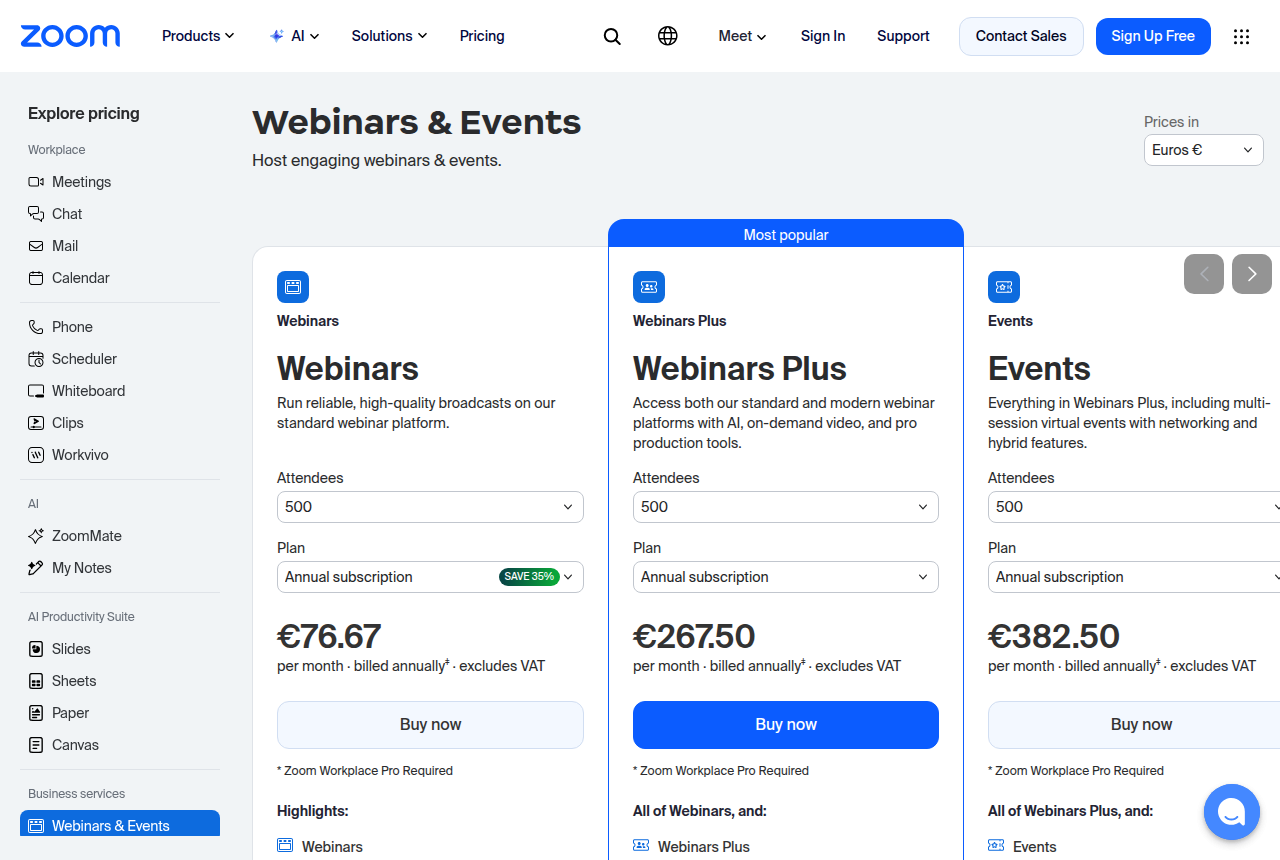
| Plan | Attendees | Monthly | Yearly, per month |
|---|---|---|---|
| Webinars | 500 | about $89 | about $66.67 |
| Webinars Plus | 500 | about $99 | about $82.50 |
Many accounts also need a base Workplace licence.
The Zoom Webinars pricing page goes further into each plan.
What hosts praise
Long-term hosts, in a Zoom webinars review, talk about reliability, ease of use, and guests who already know the software. In a thread about picking a webinar platform, people give familiarity as the reason to stay with Zoom.
A second thread, on choosing a host for an ordinary monthly webinar, lands in the same place. The advice there is to keep Zoom and skip a more complicated setup. That Digital Marketing thread says the writer's own sessions had run without problems.
Larger events draw a different complaint, and the complaint is about WebinarJam. In a thread about webinar platforms other than Zoom, a host said they would skip WebinarJam for a crowd of 700 to 3,000. They said the live event gets shaky at that size, and that support was rough for their team. That comment is about WebinarJam.
Where sellers hit a wall with Zoom
People comparing webinar platforms describe Zoom's native marketing automation as limited next to tools built for selling. They say this when they describe the emails and the replay they put together after the webinar.
Teams that have left want a concrete set of tools: registration pages, reminders, replay hosting, analytics and CRM sync, working together. A thread by people who switched lists those tools. Sales teams mention it even when the live webinar itself went well.
One host measured the delay. A host tested a webinar reminder and received it 24 hours and 13 minutes late.
A late reminder is a single email. The add-on contract runs for the whole term of the base account. Customers who have paid for Zoom across a full contract tell others to buy a webinar add-on only if they mean to keep it for that entire term, and for some time after. This warning from long-term Zoom customers is the one to read before you add it. If you might stop the webinars before the base contract ends, leave the add-on off.
Stay, add a marketing layer, or switch
For an internal training webinar, staying on Zoom is the straightforward choice. The audience already has the software, and the session is there to teach the team. You are using a tool you already pay for.
Lead generation that has to reach a CRM sits in the middle. The set of tools those teams wanted, from the registration page through CRM sync, is why the Livestorm review and the Wistia review are the next pages to read when the webinar has to feed a follow-up sequence.
A live sales pitch is where I would skip Zoom. If you need to show an offer while people are still in the webinar, read WebinarJam versus Zoom. The WebinarJam review covers that product on its own.
A replay that keeps taking registrations after the live webinar is over is a different purchase. Start with the EverWebinar review. If you are choosing between a live pitch and that replay, the WebinarJam versus EverWebinar comparison puts the two products next to each other.
If you already know Zoom is too light for the way you sell, the Zoom Webinars alternatives guide lists the other options.
My take
My take is to start with Zoom when the guests already use it, the company has standardized on it, and someone on the team can use the Events APIs for attendee data. I would skip Zoom when you need to sell on the webinar itself and you want the follow-up included.
If you sell during the webinar, the weak spot is marketing automation. Attendee data is available to a developer through those Events APIs. You still have to set up reminders, host the replay and send the update to your CRM. That extra work is also why some teams switch.
This view comes from Zoom's developer documentation and from people who have hosted on Zoom for a long time. Read how we rate tools for the full method. The full ranking is on the best video sales tools list.
Frequently asked questions
Does Zoom Webinars come with marketing automation?
What will Zoom Webinars cost?
When is the WebinarJam comparison the right next page?
Can the rest of the funnel sit outside Zoom?
Sources
- Zoom Events API documentation
- Zoom Events and Webinars pricing
- Reliability and familiarity, r/b2bmarketing
- Monthly webinars, r/DigitalMarketing
- Large live rooms, r/Zoom
- Native marketing automation, r/IntelligentEngagement
- What switching teams want bundled, r/productivity
- Late webinar reminder, r/Zoom
- Add-on contract length, r/Zoom
Open the WebinarJam and Zoom comparison

Written by
Dominic Reyes
Lead reviewer
Dominic Reyes is the lead reviewer at Play That Sells. He covers VSL players, video hosting and the attribution stack behind paid-traffic funnels, reading vendor documentation, pricing pages and years of user threads before he writes a verdict. He pays most attention to retention, conversion tracking and page-load speed. When a vendor's claims go further than what buyers report, he says so.
dominic.reyes@playthatsells.com
Last checked 2026-10-16
Comments
No comments yet. Questions and your own experience are welcome.
Thank you. Your comment will appear once it has been reviewed.