Where Uscreen fits
In its own words, Uscreen is "Video membership platform for creators.". We read its own product and pricing pages and what long-term users report, then judge it on one question: does it help the video make the sale?
What Uscreen actually is
Uscreen is a video membership platform. You upload your library, wrap it in a Netflix-style catalog, add live streaming and a community space, and charge members a recurring subscription to get in. Its headline pitch is that it also builds you your own branded apps, for phones, tablets and TV, so your content lives in the App Store and on Apple TV under your name rather than someone else's. The company says it has helped over 4,000 creators and that creators earn more than $210M a year on the platform.
The shape of the product matters more than any single feature. Uscreen is built for one job: turning an audience you already have into a paid, recurring membership. Fitness and yoga instructors, faith and education creators, niche media companies, YouTubers who want off the algorithm. If that is you, this is one of the most complete tools for it. If your video's job is to sell a product to a stranger who just clicked an ad, this is not that tool, and the rest of this review is mostly about telling those two readers apart.
The membership model is a different way to sell
Every tool on this site sells with video, but they do not all sell the same way. A video sales letter converts cold traffic into a single cart purchase. A subscription platform like Uscreen converts a warm audience into a recurring membership and then works to keep them paying month after month. That is why Uscreen's whole design is built around retention: the binge-friendly catalog, the community channels, the push notifications from the app, the calendar that reminds members to show up for a livestream. The product is optimised for the second, third and twelfth month, not for the first click.
So the question this site always asks, does the tool help the video make the sale, has a split answer here. For a recurring membership to a warm audience, Uscreen helps a great deal. For a cold-traffic VSL, it does almost nothing, because that is not what it is for.
Branded apps are the real draw
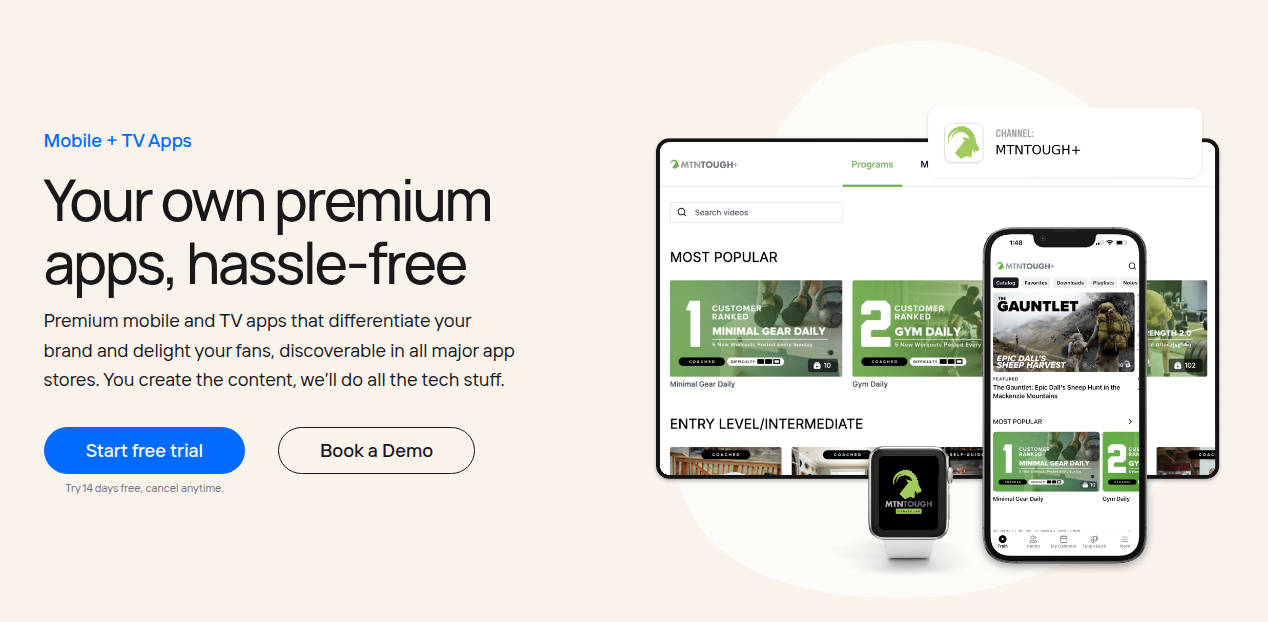
The feature people actually switch for is the apps. Uscreen builds native iOS, Android and TV apps carrying your brand, with no coding, and handles the app-store submissions. In the reviews, this is the recurring reason creators stay: an app on a member's phone and TV is far stickier than a login page in a browser, and creators report the bulk of their viewing moving into the apps once they launch. If your own app is the outcome you want, Uscreen is one of the few platforms that makes it routine rather than a custom project. Note the catch in the pricing: the apps are not on the entry plans.
What it costs, and the fee that catches people out
Uscreen has no permanent free plan, only a 14-day free trial, and the number that decides your real bill is the per-active-member fee stacked on top of the plan. Starter is $49/mo, billed monthly, with no member fee but a hard cap of 100 members, 20 hours of storage and a 10% cut of one-time sales. Growth runs $149/mo billed annually ($199 monthly) and adds $1.99 per active member, unlimited members, a custom domain and 100 hours of storage. App Essentials runs $449/mo annually ($499 monthly), charges a lower $0.99 per member, and is the first plan to include your two branded mobile apps and free migration support. The Custom tier is quote-only and adds TV apps, the community feature, API access, white-label and a dedicated success manager.
Work the fee through and the picture is clear. On Growth, 500 members costs about $1,150 a month and 1,000 members about $2,100, before you count the base plan properly. That is why reviewers keep calling Uscreen an established-creator tool: at 20 members it is cheap, and at 2,000 it is a serious line item. One useful wrinkle: because App Essentials charges a lower $0.99 per member, it becomes cheaper than Growth once you pass roughly 300 active members, so a growing membership can be paying more on the smaller plan. Whatever tier you land on, run your own member count against the fee before you sign, because the marketing quotes the base price, not the total.
What real buyers say
The praise is consistent and specific. On Capterra, one reviewer wrote that "the white-labelled app has been a major highlight, allowing us to present [our brand] as a fully branded, professional platform, which has significantly increased trust and retention." On Trustpilot, a happy customer said "their customer support is always fast to reply and they are always looking at ways to work with us." That is the platform working as intended for a creator with an audience to serve.
The criticism clusters around cost, support and cancellation. A Trustpilot reviewer described "the absolute inability to speak to an actual person" and an email that "isn't answered until 3am and my issue is not being addressed." Another, on trying to leave, asked why a confident company would "put obstacles so that people have to jump over barriers to cancel." None of it says the platform does not work. It says the support and billing experience is not as polished as the product, and that is worth knowing before you depend on it.
Support and cancellation
Support runs on email and chat. There is no phone line on the standard plans, and end-user help for your members only arrives on the higher tiers. Most reviewers are positive, but the negative reports share a pattern: when something breaks during a launch, an email-only channel with off-hours replies is stressful. Cancellation, likewise, is handled by email rather than a button in the dashboard. Set expectations accordingly, keep your own reminder before a renewal date, and read the cancellation terms the day you sign up rather than the day you want out.
What it will not do for a VSL
Here is the honest gap for this site's reader. Uscreen has no sound-first autoplay player tuned to hold a cold viewer through a pitch, no per-second retention curve that separates buyers from non-buyers, no split test you decide on real sales, and no attribution that connects a play to a purchase in a cart and posts the conversion back to Meta or TikTok. Its analytics report engagement, watch time and membership growth, which is exactly what a subscription business needs and nothing like what a direct-response marketer needs. If your video's job is to turn a stranger's ad click into a purchase, the tools built for that job hand you the CTAs, the buyer analytics and the attribution out of the box, and Uscreen does not, because it is built for memberships, not funnels.
Who should buy it, and who should not
Buy Uscreen if you already have an audience and you want to turn it into a recurring membership with your own branded apps and a community around the content. For that creator it is one of the most complete choices in this roundup, the apps are genuinely a differentiator, and the earnings on the platform show the model holds up. Skip it if you are running VSLs or evergreen webinars on cold paid traffic: you would be paying premium membership prices for retention features while missing every conversion tool your funnel actually needs. And whoever you are, price it on your real member count, not the sticker.
Changelog
- 28 September 2026. First published. Plans and per-member fees checked against Uscreen's own pricing page; user themes drawn from long-term Capterra and Trustpilot reviews. Research is pending human verification of each quote.